> ## Documentation Index
> Fetch the complete documentation index at: https://docs.flashquotes.com/llms.txt
> Use this file to discover all available pages before exploring further.
# Real-Time Availability
> Learn how the real-time availability feature helps customers understand your booking status
## Overview
The Real-Time Availability feature provides instant feedback to potential customers about your availability for their desired event dates. This helps set expectations early in the inquiry process and saves you time by reducing requests for dates when you're already fully booked.
## How It Works
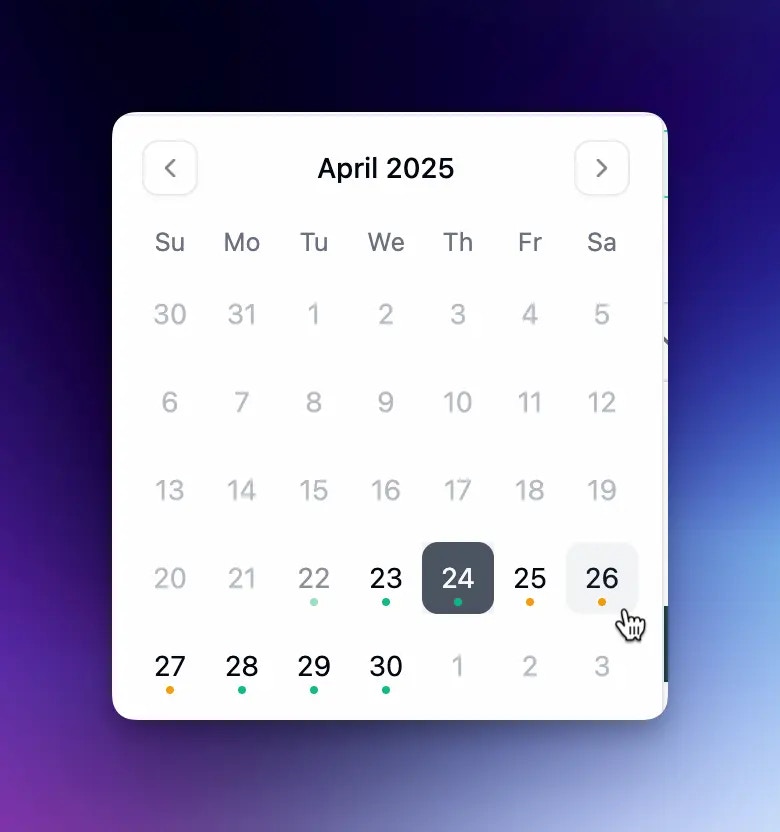
When browsing dates on your form, customers will see visual indicators of your availability:
* **Available dates**: Dates when you have capacity for new bookings
* **Limited availability**: Dates when you're approaching capacity or have blocked dates
 After selecting a date, customers see clear availability messages:
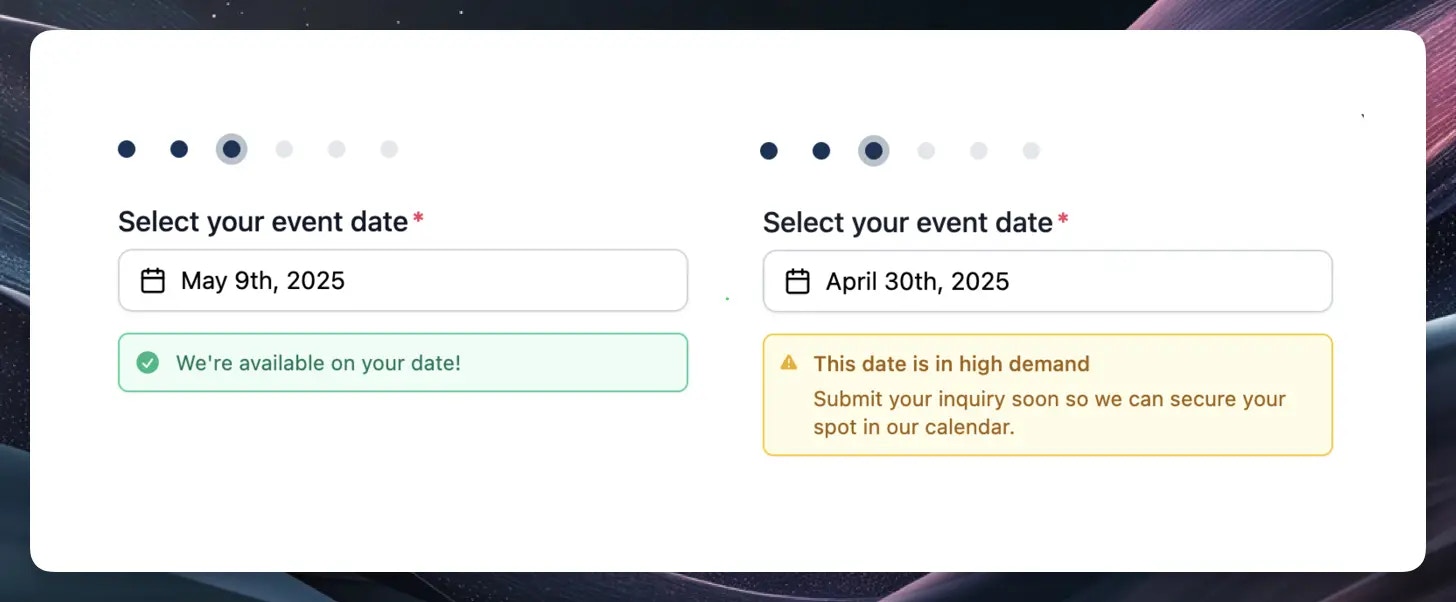 Even when dates show limited availability, customers can still submit requests, but they'll do so understanding they might need flexibility.
## Availability Factors
If you've marked a date as blocked, it will automatically show as unavailable to customers.
Use blocked dates for:
* Company holidays
* Days you know you can't service events
* Maintenance periods
* Personal time off
To manage blocked dates, use the [Calendar](/calendar) feature to mark dates as unavailable.
The system determines availability by analyzing:
* How many total resources you have available
* How many resources are already committed to other events on that date
**Example scenarios:**
* If you have 4 carts total, and 2 are already booked for a date, that date will show as available (green)
* If all 4 carts are booked, the date will show as limited availability (yellow)
You can adjust your resource capacity in the [Resources](/resources) section to ensure your availability is accurately displayed.
If your business operates in multiple locations:
* You can set different resources for each location
* Availability will display based on the specific location's capacity
* Customers will see availability specific to their selected location
Make sure to properly assign resources to each location in your [Settings](/settings) to ensure accurate availability display.
## Setting Up For Success
Make sure your total available resources reflect your actual capacity. If you hire more staff or add equipment, update your [resources](/resources) accordingly.
Keep your calendar up-to-date by:
* Blocking off dates when you know you won't be available
* Ensuring events have the correct number of resources assigned
* Regularly reviewing your upcoming bookings
Periodically check how your availability appears to customers:
* Test your form to see availability displays
* Verify blocked dates are showing correctly
* Ensure resource allocations are accurate
## Business Benefits
The Real-Time Availability feature provides several advantages:
* **Time savings:** Reduce time spent responding to requests for dates when you're fully booked
* **Expectation management:** Set clear expectations with potential customers from the start
* **Resource optimization:** Better manage your resource allocation across events
* **Improved visibility:** Maintain an accurate, real-time view of your availability
## Related Features
* [Lead Intake Form](/forms/lead-intake)
* [Calendar Management](/calendar)
* [Resource Management](/resources)
* [Booking Management](/bookings)
Even when dates show limited availability, customers can still submit requests, but they'll do so understanding they might need flexibility.
## Availability Factors
If you've marked a date as blocked, it will automatically show as unavailable to customers.
Use blocked dates for:
* Company holidays
* Days you know you can't service events
* Maintenance periods
* Personal time off
To manage blocked dates, use the [Calendar](/calendar) feature to mark dates as unavailable.
The system determines availability by analyzing:
* How many total resources you have available
* How many resources are already committed to other events on that date
**Example scenarios:**
* If you have 4 carts total, and 2 are already booked for a date, that date will show as available (green)
* If all 4 carts are booked, the date will show as limited availability (yellow)
You can adjust your resource capacity in the [Resources](/resources) section to ensure your availability is accurately displayed.
If your business operates in multiple locations:
* You can set different resources for each location
* Availability will display based on the specific location's capacity
* Customers will see availability specific to their selected location
Make sure to properly assign resources to each location in your [Settings](/settings) to ensure accurate availability display.
## Setting Up For Success
Make sure your total available resources reflect your actual capacity. If you hire more staff or add equipment, update your [resources](/resources) accordingly.
Keep your calendar up-to-date by:
* Blocking off dates when you know you won't be available
* Ensuring events have the correct number of resources assigned
* Regularly reviewing your upcoming bookings
Periodically check how your availability appears to customers:
* Test your form to see availability displays
* Verify blocked dates are showing correctly
* Ensure resource allocations are accurate
## Business Benefits
The Real-Time Availability feature provides several advantages:
* **Time savings:** Reduce time spent responding to requests for dates when you're fully booked
* **Expectation management:** Set clear expectations with potential customers from the start
* **Resource optimization:** Better manage your resource allocation across events
* **Improved visibility:** Maintain an accurate, real-time view of your availability
## Related Features
* [Lead Intake Form](/forms/lead-intake)
* [Calendar Management](/calendar)
* [Resource Management](/resources)
* [Booking Management](/bookings)