> ## Documentation Index
> Fetch the complete documentation index at: https://docs.flashquotes.com/llms.txt
> Use this file to discover all available pages before exploring further.
# Share Links & Hosted Forms
> Create professional Flashquotes-hosted pages perfect for social media, Instagram, and direct sharing
## Overview
Share links create professional Flashquotes-hosted pages for your forms. No embedding required - just share the link anywhere your customers are.
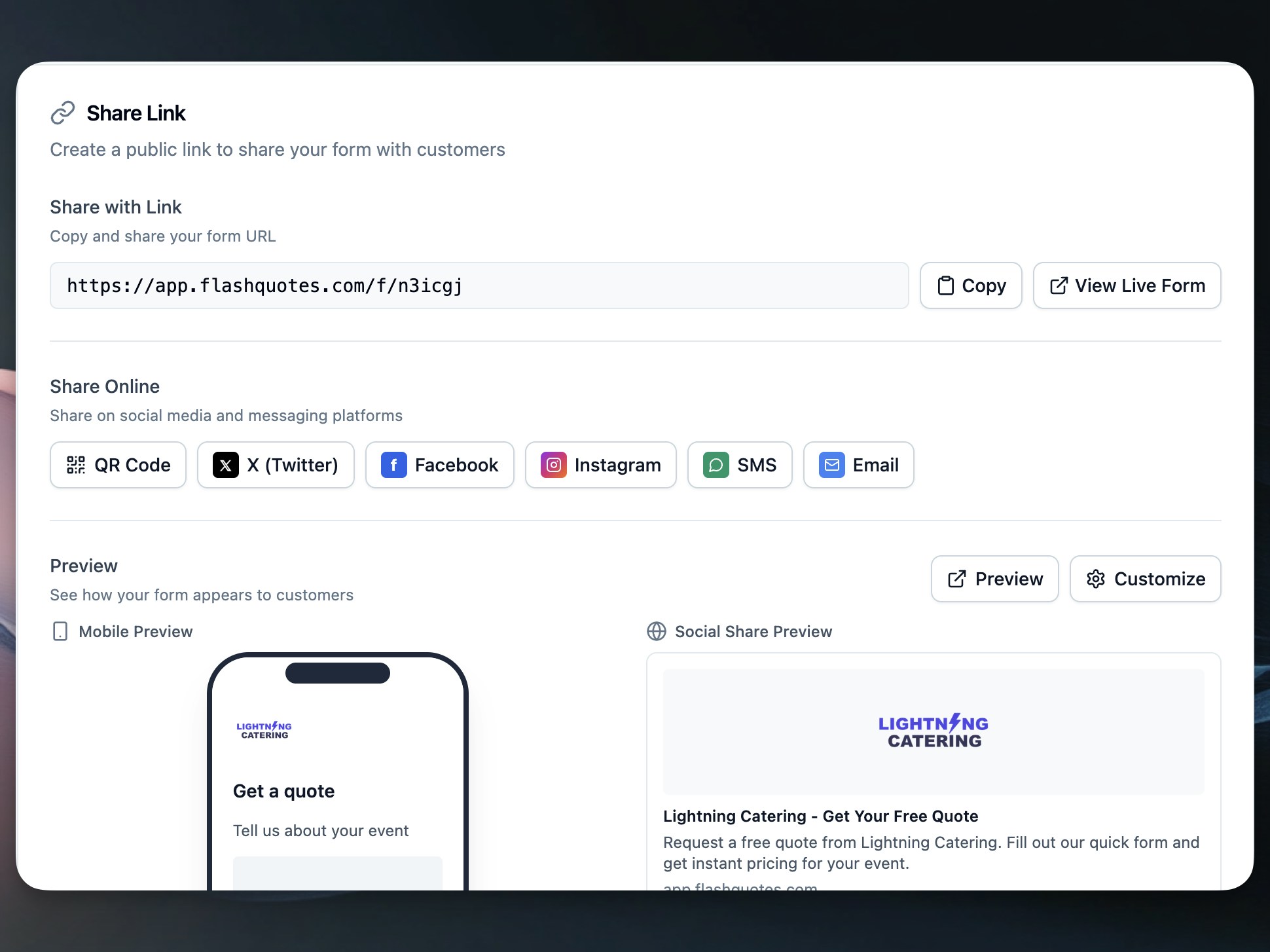 Perfect for Instagram link-in-bio since Instagram doesn't allow clickable links in posts.
## Creating a Share Link
1. Go to **Forms** and select your form
2. Click the **Share** tab
3. Customize your landing page settings
4. Copy your share link or QR code
Your form is now live at a `/f/{slug}` URL ready to share.
## Customization Options
### Landing Page Content
**Headline**: The main title visitors see when they arrive
* Keep it benefit-focused ("Get Your Custom Quote")
* Under 60 characters for best display
**Subheadline**: Supporting text under your headline
* Explain what happens next
* Build trust and set expectations
* Example: "Tell us about your event and we'll send you a personalized quote within 24 hours"
### Company Branding
Your hosted page automatically includes:
* Company logo and brand colors
* Professional Flashquotes styling
* Mobile-optimized design
* Fast loading times
## Social Media Sharing
Built-in sharing buttons for:
* **Twitter/X**: Pre-populated tweet with your link
* **Facebook**: Direct share to timeline or business page
* **Instagram**: Copy link for bio or story links
* **SMS**: Send link via text message
* **Email**: Create email with link included
## Instagram Link-in-Bio
Instagram users can only include one clickable link in their bio. Use your share link to:
1. Add your Flashquotes link to your Instagram bio
2. Post about your services with "Link in bio for quotes"
3. Drive followers directly to your quote form
4. Convert Instagram engagement into bookings
Update your Instagram bio text to include a call-to-action like "Get your event quote ↗️" to draw attention to the link.
## QR Code Generation
Every share link includes a QR code for offline marketing:
1. Click **Download QR Code** in the Share tab
2. Add to business cards, flyers, or signage
3. Customers scan to access your quote form instantly
**QR Code Uses:**
* Business cards and brochures
* Event booth displays
* Vehicle decals
* Print advertisements
## Embedded vs Hosted Forms
| Feature | Embedded Forms | Share Links |
| -------------------- | ------------------------ | ------------------------------ |
| Setup Time | Requires website editing | Instant - just copy link |
| Best For | Your own website | Social media, direct sharing |
| Customization | Limited by your site | Full control over landing page |
| Mobile Experience | Depends on your site | Optimized for mobile |
| Instagram Compatible | No | Yes - perfect for link-in-bio |
| QR Codes | Not practical | Built-in QR generation |
## SEO & Meta Tags
Share links include automatic SEO optimization:
* Proper page titles and descriptions
* Social media preview cards
* Mobile-friendly meta tags
* Fast loading for better search ranking
When shared on social platforms, your link displays with:
* Your company name and logo
* Custom headline as the preview title
* Professional preview image
## Preview Functionality
Test your hosted page before sharing:
1. Click **Preview** in the Share tab
2. View how your page appears on desktop and mobile
3. Test the form submission process
4. Make adjustments to headlines or settings
5. Publish when satisfied
## Common Use Cases
**Instagram Business**: Share link in bio, reference in posts and stories
**Wedding Vendors**: Include QR codes on vendor fair displays and business cards
**Food Trucks**: QR codes on vehicle signage for instant quote requests
**Event Planners**: Send direct links to potential clients via email or text
**Corporate Services**: Professional sharing for B2B quote requests
## Best Practices
1. **Keep headlines clear**: Focus on the benefit customers receive
2. **Test on mobile**: Most social traffic comes from mobile devices
3. **Update regularly**: Refresh headlines to match current promotions
4. **Use QR codes strategically**: Place them where customers have time to scan
## Next Steps
After setting up your share link:
* Add it to your Instagram bio
* Include QR codes in marketing materials
* Share on social media platforms
* [Track your pipeline](/pipeline) to monitor conversions
* [Configure Instant Quoting](/forms/lead-intake#instant-quoting) for faster conversions
Perfect for Instagram link-in-bio since Instagram doesn't allow clickable links in posts.
## Creating a Share Link
1. Go to **Forms** and select your form
2. Click the **Share** tab
3. Customize your landing page settings
4. Copy your share link or QR code
Your form is now live at a `/f/{slug}` URL ready to share.
## Customization Options
### Landing Page Content
**Headline**: The main title visitors see when they arrive
* Keep it benefit-focused ("Get Your Custom Quote")
* Under 60 characters for best display
**Subheadline**: Supporting text under your headline
* Explain what happens next
* Build trust and set expectations
* Example: "Tell us about your event and we'll send you a personalized quote within 24 hours"
### Company Branding
Your hosted page automatically includes:
* Company logo and brand colors
* Professional Flashquotes styling
* Mobile-optimized design
* Fast loading times
## Social Media Sharing
Built-in sharing buttons for:
* **Twitter/X**: Pre-populated tweet with your link
* **Facebook**: Direct share to timeline or business page
* **Instagram**: Copy link for bio or story links
* **SMS**: Send link via text message
* **Email**: Create email with link included
## Instagram Link-in-Bio
Instagram users can only include one clickable link in their bio. Use your share link to:
1. Add your Flashquotes link to your Instagram bio
2. Post about your services with "Link in bio for quotes"
3. Drive followers directly to your quote form
4. Convert Instagram engagement into bookings
Update your Instagram bio text to include a call-to-action like "Get your event quote ↗️" to draw attention to the link.
## QR Code Generation
Every share link includes a QR code for offline marketing:
1. Click **Download QR Code** in the Share tab
2. Add to business cards, flyers, or signage
3. Customers scan to access your quote form instantly
**QR Code Uses:**
* Business cards and brochures
* Event booth displays
* Vehicle decals
* Print advertisements
## Embedded vs Hosted Forms
| Feature | Embedded Forms | Share Links |
| -------------------- | ------------------------ | ------------------------------ |
| Setup Time | Requires website editing | Instant - just copy link |
| Best For | Your own website | Social media, direct sharing |
| Customization | Limited by your site | Full control over landing page |
| Mobile Experience | Depends on your site | Optimized for mobile |
| Instagram Compatible | No | Yes - perfect for link-in-bio |
| QR Codes | Not practical | Built-in QR generation |
## SEO & Meta Tags
Share links include automatic SEO optimization:
* Proper page titles and descriptions
* Social media preview cards
* Mobile-friendly meta tags
* Fast loading for better search ranking
When shared on social platforms, your link displays with:
* Your company name and logo
* Custom headline as the preview title
* Professional preview image
## Preview Functionality
Test your hosted page before sharing:
1. Click **Preview** in the Share tab
2. View how your page appears on desktop and mobile
3. Test the form submission process
4. Make adjustments to headlines or settings
5. Publish when satisfied
## Common Use Cases
**Instagram Business**: Share link in bio, reference in posts and stories
**Wedding Vendors**: Include QR codes on vendor fair displays and business cards
**Food Trucks**: QR codes on vehicle signage for instant quote requests
**Event Planners**: Send direct links to potential clients via email or text
**Corporate Services**: Professional sharing for B2B quote requests
## Best Practices
1. **Keep headlines clear**: Focus on the benefit customers receive
2. **Test on mobile**: Most social traffic comes from mobile devices
3. **Update regularly**: Refresh headlines to match current promotions
4. **Use QR codes strategically**: Place them where customers have time to scan
## Next Steps
After setting up your share link:
* Add it to your Instagram bio
* Include QR codes in marketing materials
* Share on social media platforms
* [Track your pipeline](/pipeline) to monitor conversions
* [Configure Instant Quoting](/forms/lead-intake#instant-quoting) for faster conversions