> ## Documentation Index
> Fetch the complete documentation index at: https://docs.flashquotes.com/llms.txt
> Use this file to discover all available pages before exploring further.
# Service Days
> Create multi-day quotes with flexible scheduling
## Overview
Service days let you build multi-day quotes with different dates and times per day. Perfect for wedding weekends, corporate events, and festivals.
Each service day becomes a separate event when the quote is booked.
## How It Works
1. **Add service days** to your quote with different dates/times
2. **Client books** - each service day becomes an event
3. **Manage events** separately while keeping them under one booking
## Creating Service Days
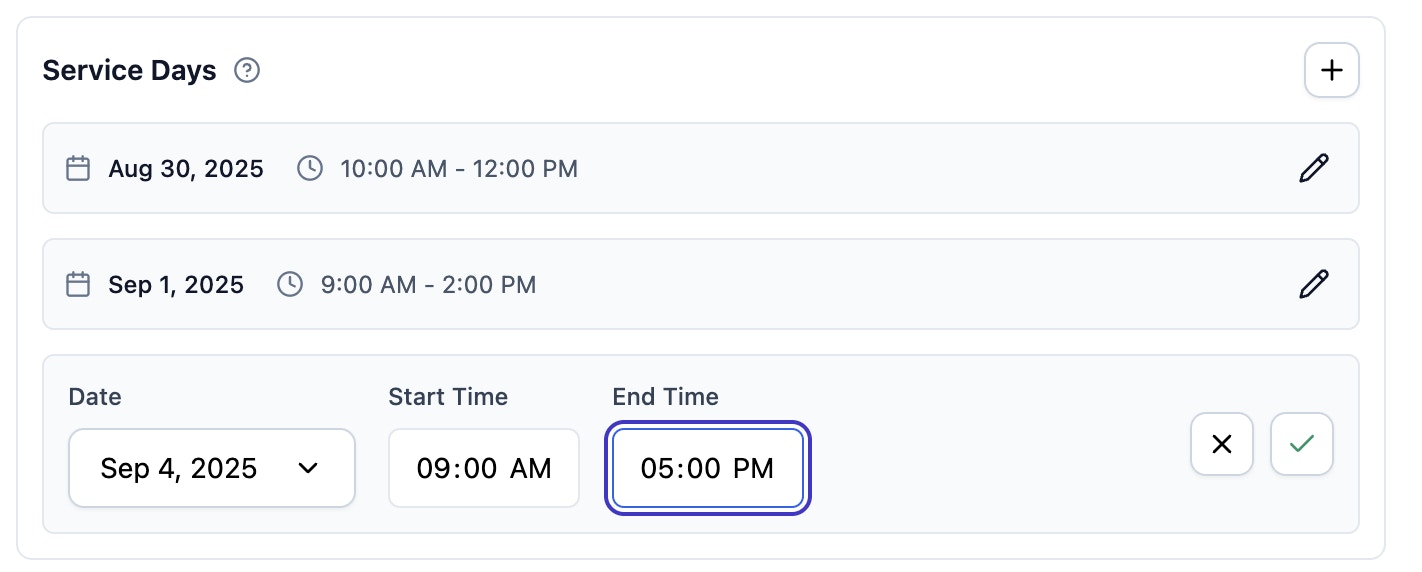 Navigate to a quote and find the Service Days section.
Click + to add a service day.
Pick date and set start/end times.
Click check icon to save.
## Managing Service Days
### Edit
* Click pencil icon to edit any service day
* Change date, start time, or end time
* Save with check icon, cancel with X
### Remove
* Click trash icon to delete
* Can't delete the last service day
* Associated line items are also removed
Deleted service days cannot be recovered.
## Common Scenarios
### Wedding Weekend
* **Day 1**: Setup/rehearsal (2-4 hours)
* **Day 2**: Main wedding (8-12 hours)
* **Day 3**: Breakdown (2-3 hours)
### Corporate Event
* **Day 1**: Setup (4-6 hours)
* **Day 2**: Main event (8-10 hours)
* **Day 3**: Breakdown (3-4 hours)
### Festival
* **Day 1**: Setup
* **Day 2**: Main festival
* **Day 3**: Closing/breakdown
## Best Practices
### Planning
1. Start with main event day
2. Add setup/breakdown days
3. Include buffer time
4. Consider staff availability
### Pricing
* Charge different rates for setup vs main event days
* Offer package discounts for multi-day events
* Use different add-ons per day
## Integration
### Quote Template
* Each service day shows with specific date/time
* Real-time availability per day
* Professional multi-day presentation
### Booking Flow
* Service days become separate events
* All events linked under one booking
* Single invoice covers all days
## Troubleshooting
You must keep at least one service day per quote.
Check your location settings in company settings.
Click the check icon to save. X icon cancels edits.
## Next Steps
* [Create quotes](/leads/quotes)
* [Quote template](/leads/quote-view)
* [Manage bookings](/bookings)
* [Handle events](/events)
Navigate to a quote and find the Service Days section.
Click + to add a service day.
Pick date and set start/end times.
Click check icon to save.
## Managing Service Days
### Edit
* Click pencil icon to edit any service day
* Change date, start time, or end time
* Save with check icon, cancel with X
### Remove
* Click trash icon to delete
* Can't delete the last service day
* Associated line items are also removed
Deleted service days cannot be recovered.
## Common Scenarios
### Wedding Weekend
* **Day 1**: Setup/rehearsal (2-4 hours)
* **Day 2**: Main wedding (8-12 hours)
* **Day 3**: Breakdown (2-3 hours)
### Corporate Event
* **Day 1**: Setup (4-6 hours)
* **Day 2**: Main event (8-10 hours)
* **Day 3**: Breakdown (3-4 hours)
### Festival
* **Day 1**: Setup
* **Day 2**: Main festival
* **Day 3**: Closing/breakdown
## Best Practices
### Planning
1. Start with main event day
2. Add setup/breakdown days
3. Include buffer time
4. Consider staff availability
### Pricing
* Charge different rates for setup vs main event days
* Offer package discounts for multi-day events
* Use different add-ons per day
## Integration
### Quote Template
* Each service day shows with specific date/time
* Real-time availability per day
* Professional multi-day presentation
### Booking Flow
* Service days become separate events
* All events linked under one booking
* Single invoice covers all days
## Troubleshooting
You must keep at least one service day per quote.
Check your location settings in company settings.
Click the check icon to save. X icon cancels edits.
## Next Steps
* [Create quotes](/leads/quotes)
* [Quote template](/leads/quote-view)
* [Manage bookings](/bookings)
* [Handle events](/events)